Real-Time View

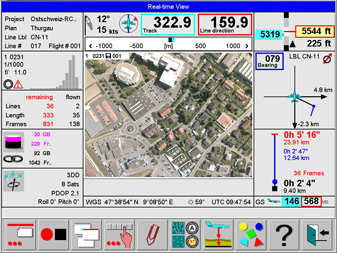
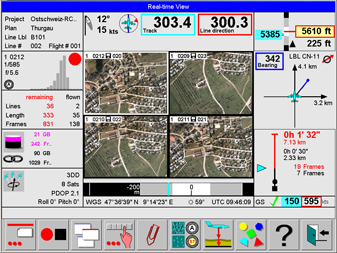
The Real-time view displays the Thumbnail. It can be displayed with controls located on the left side and on the right side. One large or four smaller thumbnails can be displayed.

To display this view from flight menu proceed as follows:

Select 009-SelDisp.bmp display buttons to select view.

Select 018-Video.bmp to display the thumbnails.

Example of Real-time view

FCMS-Realtime-with-controls.png

Real-time view with controls during approach

FCMS-Realtime-with-controls-onLine.png

Real-time view with controls on the line

Select 004-Config.bmp to configure the Real-time view. See section Software (Global1) Configuration | Real time view.

Select 010-DispMore.bmp to display more buttons related to the Real-time view

After More buttons is selected, the following buttons can be selected:

Select 092-ZoomWrap.bmp to toggle between display of one or four thumbnails.

Select 064-VideoCon-.bmp or 065-VideoCon+.bmp to change the contrast of the thumbnail.

Select 062-VideoDrk.bmp or 063-VideoBrt.bmp to change the brightness of the thumbnail.