
Graphic and alphanumeric in-flight evaluation
To display this views from flight menu proceed as follows:
Select 
Select 
Project data is displayed either graphically or numerically. To toggle, select the corresponding icon which is displayed on the toolbar alternatively.
In-flight evaluation - graphic view
Select 
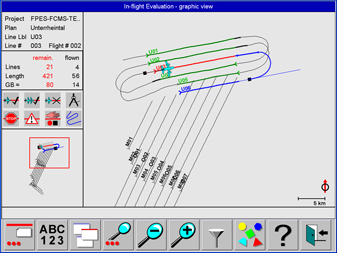
This view provides a graphic project overview for inflight evaluation and control of project execution. The orientation is North-up.
A description of the controls displayed on this view is given in Layout of the Navigation Views and Project Controls.
In the In-flight evaluation view lines can be selected by touching the line and the map can be panned by touching the graphics and dragging the map with the finger.
According to the configuration of the map layer for the Operator additional information like vector maps, GCP and GNSS ground reference station locations and bitmap maps or Elevation encoded or Shaded Relief DTM information might be displayed as background.
Footprints of flight lines are displayed if SRTM DTM data are installed for the displayed area. Map layer configuration see section Guidance Project.
Examples see section Backdrop Maps.
Select 
Filters to query project and flight data
|
Icon |
Purpose |
|---|---|

|
Show flight lines flown once |

|
Hide flight lines flown once |

|
Show flight lines flown more than once |

|
Hide flight lines flown more than once |

|
Show flown flight lines with warnings |

|
Hide flown flight lines with warnings |

|
Show flown flight lines with errors |

|
Hide flown flight lines with errors |

|
Show flight lines not yet flown |

|
Hide flight lines not yet flown |

|
Show unplanned flight lines |

|
Hide unplanned flight lines |

|
Show flight planning. |

|
Hide flight planning. |

|
Show aircraft flight path. |

|
Hide aircraft flight path. |
Select 
After
Use 

The map can also be panned by touching the map and dragging the map with a finger.
Use 

The map can also be panned by touching the map and dragging the map with a finger.
Select 

Select 
Select 
In-flight evaluation - alphanumeric view
Select 
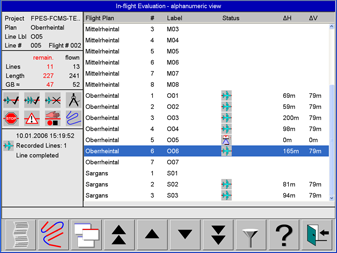
This view is for in-flight evaluation. It lists for each flight line the most relevant data.
A description of the controls displayed on this view is given in Layout of the Navigation Views and in Project Controls.
Select 
Select 

Select 

Select
The settings are given in Filters to query project and flight data .