
Nose-up view
To display this view from flight menu proceed as follows:
Select 
Select 
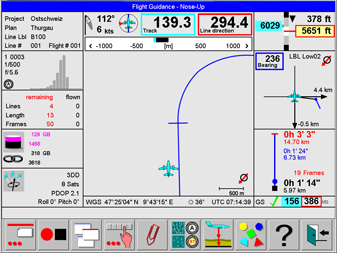
This view is optimized for the pilot. It provides graphic flight guidance information during approaches and turns. The orientation is nose-up. North direction is indicated on the lower right corner of the Nose-up navigation control.
A description of the controls displayed on this view is given in Layout of the Navigation Views, Flight guidance controls and Project Controls.
Select 
Select 
Select 
Select
Select 
North-up view
To display this view from flight menu proceed as follows:
Select
Select 
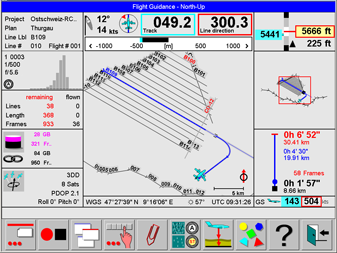
This view displays a project overview in north-up orientation. Flight guidance information is optimized for approaches and turns.
A description of the controls displayed on this view is given in Layout of the Navigation Views, Flight guidance controls and Project Controls.
In the North-up view lines can be selected by touching the line and the graphic content can be panned by touching the graphics and dragging it with the finger.
Select
Select
Select
Select
Select
Select 
After
Use
The map can also be panned by touching the map and dragging the map with a finger.
Use
The map can also be panned by touching the map and dragging the map with a finger.
Select 
Select 
In-line view
To display this view from flight menu proceed as follows:
Select
Select 
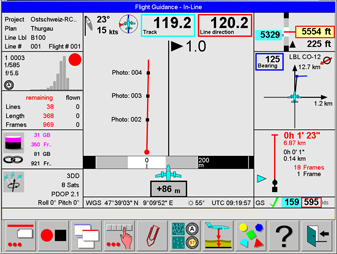
This view is optimized for the pilot. It provides graphic flight guidance information during line execution.
A description of the controls displayed on this view is given in Layout of the Navigation Views, Flight guidance controls and Project Controls.
Select
Select
3-D Navigation view
The 3-D Navigation view is useful when executing the flight plan in the target height mode ‘Constant ALT-AGL’. A mission intended for flying at constant ALT-AGL must be planned on Leica MissionPro for an equal terrain height along the line. A DEM has to be loaded in Leica MissionPro, but not taken into account for computation. The resulting flight plan will have height information for each waypoint along the flight line. The waypoints are used by Leica FlightPro to display the navigation information.
To display this view from flight menu proceed as follows:
Select
Select 
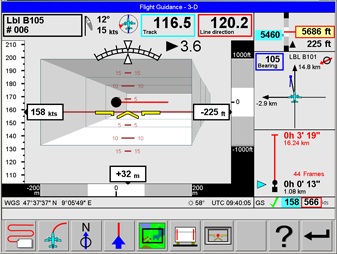
This view is optimized for the pilot. It provides graphic flight guidance information during line execution.
A description of the controls displayed on this view is given in Layout of the Navigation Views, Flight guidance controls and Project Controls.
Select
Select