
Views
Different views can be selected during flight execution. See section View Configuration. The views are composed of controls.
Controls
What is a control
A control is an area on a view which shows data and information that is relevant during flight execution. There are various type of controls.
System controls
-
Information about the hardware like Sensor, Memory, GNSS etc.
Flight guidance controls
-
Information to navigate.
General controls
-
Information about the project, Zoom factor of graphic displays etc.
Controls on the navigation views
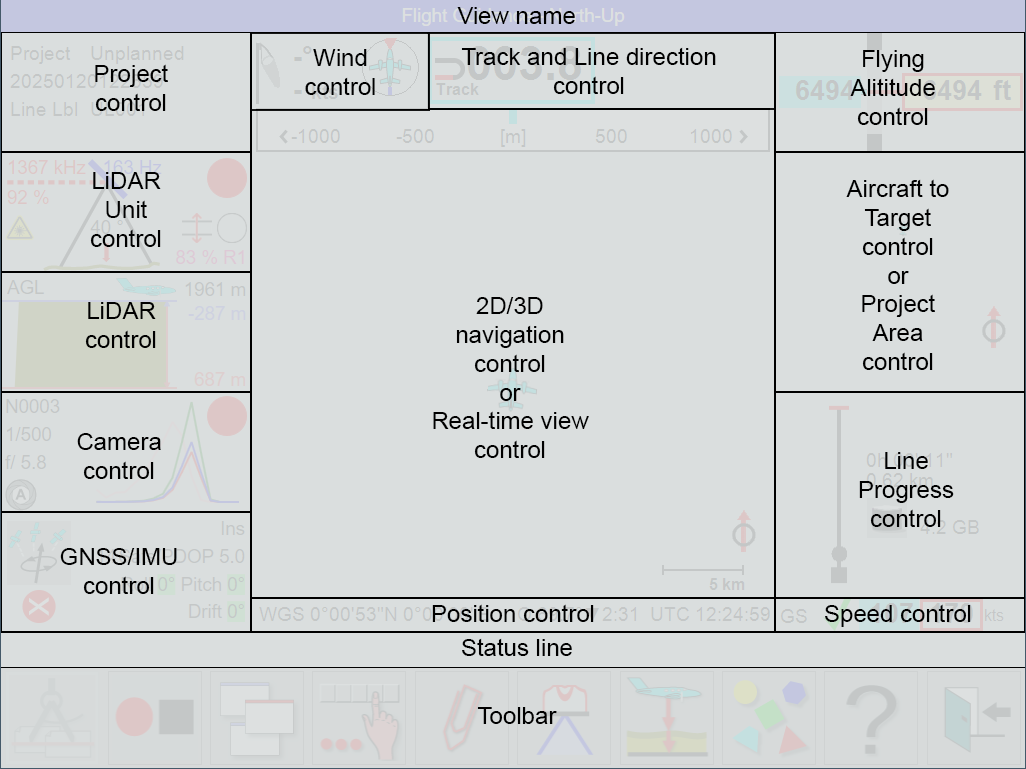
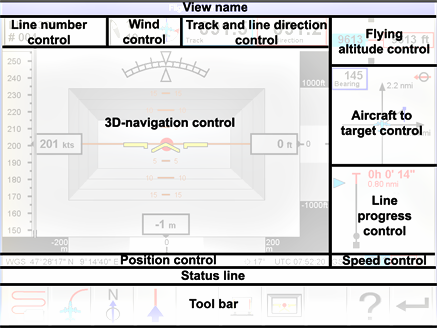
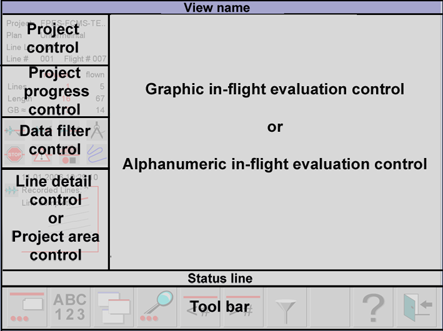
For more details on the various controls, see:
-
Project control see section Project Controls
-
Sensor control see section System controls
-
Project progress control see section Project progress control
-
Memory control see section Memory control
-
GNSS control see section GNSS/IMU control
-
Wind control see section Wind control
-
Track and line direction control see section Track and line direction control
-
Position control see section Position control
-
Nose-up navigation control see section Nose-up navigation control
-
North-up navigation control see section North-up navigation control
-
In-line navigation control see section In-line navigation control
-
3-D Navigation view see section 3-D Navigation control
-
Real-time view control see section Real-Time View
-
Flying altitude control see section Range and Height control
-
Aircraft to target control see section Aircraft to target control
-
Line progress control see section Line progress control
-
Speed control see section Speed control
-
Project control see section Project control
-
Project progress control see section Project progress control
-
Data filter control see section Data filter control
-
Line detail control see section Line detail control
-
Project area control see section Project area control
-
Graphic in-flight evaluation control see section Graphic in-flight evaluation control
-
Alphanumeric in-flight evaluation control see section Alphanumeric in-flight evaluation control