In case the triangulation results need to be delivered or are planned to be used in 3rd party application, HxMap provides the option to export EO parameter and ground points as well as an interface to Imagine Photogrammetry/ Orima. The Import/ Export options are available in the Tools menu.
Importing triangulation results
Allows to import a LPS project with triangulation results into an existing HxMap AT project. Pick the path pointing to the LPS project, review and update the reference system and check “Update Take” to replace the EO parameter.
Export EOP
Export EOP in Triangulation perspective allows to export EOP from the triangulation project with the current adjustment result. Export formats are the same as described in exporting to third-party applications.
IPAS-CO+ export is only available in QC perspective as unadjusted EOPs are always assumed.
Exporting Ground Points
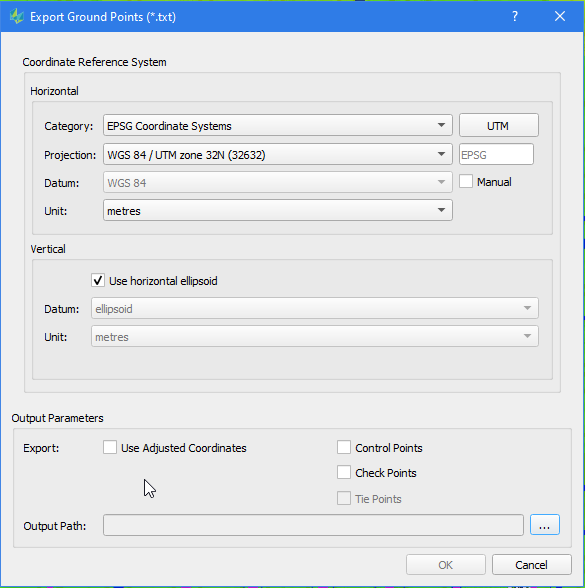
Ground points can be exported by using the corresponding tool in the Tools menu. First select points from the Points list to activate the tool.
-
Define the coordinate reference system for export. The system of the triangulation project is selected by default.
-
After triangulation adjustment you can select adjusted coordinates or unadjusted.
-
Optionally filter the type of points to include in the export