
The user defined Object-ID is a major property for a building. The building generation workflow with building footprints (CityModeller) is using a footprint attribute as Object-ID and applies it to the resulting building object. The building generation without using building footprints (BuildingFinder) is generating the Object-ID with the Object-ID Generator automatically.
With the capturing functions in the 3D Editor it is possible to generate new building objects. To assign or update the Object-IDs automatically the Object-ID Generator tool is also available in the 3D Editor perspectives Tools menu.
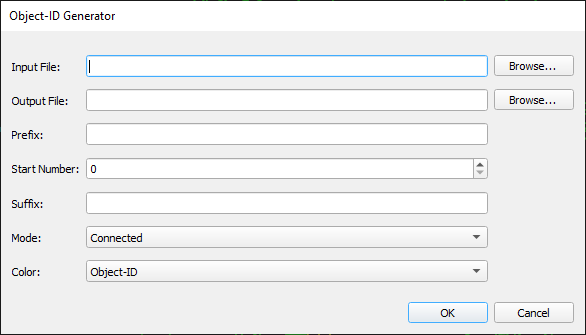
-
Input File: Building model file in tdc file format
-
Output File: Building model file in tdc file format (can be the same as Input File)
-
Prefix: Text string before the running number
-
Start Number: Starting integer number
-
Suffix: Text string after the running number
-
Mode: Calculation mode to compute which parts belong to a building:
-
Connected: All connected objects get the same Object-ID
-
Overlapping: All overlapping objects get the same Object-ID
-
Single: Every single building part get an own Object-ID
-
-
Color: Method to colorize the building object
-
Object-ID: All objects with the same Object-ID get the same color
-
Quality: Objects are colorized by using the quality property
-
Unique: Every single object get its own color
-