
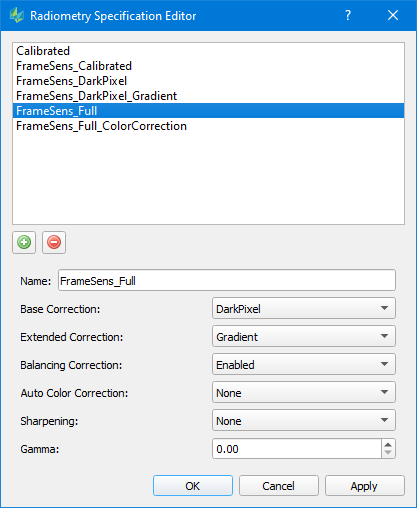
The radiometry template defines all the image radiometric corrections that are applied to the output product for both images and colorized point clouds. By clicking on the green plus icon a new radiometry template is created. Note that the order of the corrections is significant in that they are applied from top to bottom.
-
Name:
Name of the template. It is recommended to have an explicit name for better reference. -
Base Correction:
-
"Calibrated" – produces Apparent Reflectance image output
-
"DarkPixel" – produces Apparent Reflectance image output including a dark pixel correction
-
-
Extended Correction:
The extended correction sits on top of the base correction.-
“Gradient” – can be added on top of a DarkPixel corrected image, removes brightness gradient within an image
-
-
Balancing Correction
If enabled, the radiometric normalization calculated in Ingest / Blockwide Radiometry will be applied to the provide a color-balanced product with uniform brightness and contrast. The Balancing Correction requires Dark Pixel and Gradient corrections to also be applied. -
Auto Color Correction
Correction is based on the sensor’s multispectral bandwidth, and offers the possibility to enhance saturation of the images. NOTE: The auto color correction is only available for sensor systems with MFC150/MFC250 camera -
Sharpening
Option to apply an image sharpening filter to the output product. The available settings for Sharpening:-
"Mild", "Medium", "Strong": luminance convolution filter applied uniformly across entire image. All with 3x3 kernel size, and increasing strength from “Mild” to “Strong”.
-
"Selective_Medium", "Selective_Strong": luminance convolution filter selectively applied to enhance edges. Selective_Medium with 3x3 kernel size, Selective_Strong with 5x5 kernel size.
-
-
Gamma:
Gamma correction that can be applied to the product.-
It’s not recommended to provide a setting here, if a radiometric profile will be used.
-
-
Radiometric specification is affecting image radiometry only, and not radiometry of lidar intensity values
-
Select an appropriate radiometry specification for image and image derivative products like Ortho, Aerial, Infocloud, colorized Point Cloud, 3D Model texture, and 3D Advanced
-
When selecting a radiometry specification for a non-colorized point cloud product template, it is sufficient to select Calibrated radiometry only.