
The session perspective allows to load raw data either directly from the mass memory used or after copying the raw data to a secondary storage.
-
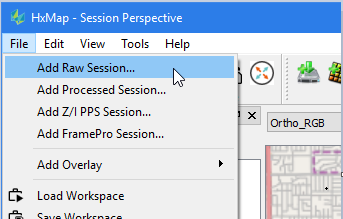
Go to 'File > Add Raw Session ..'
-
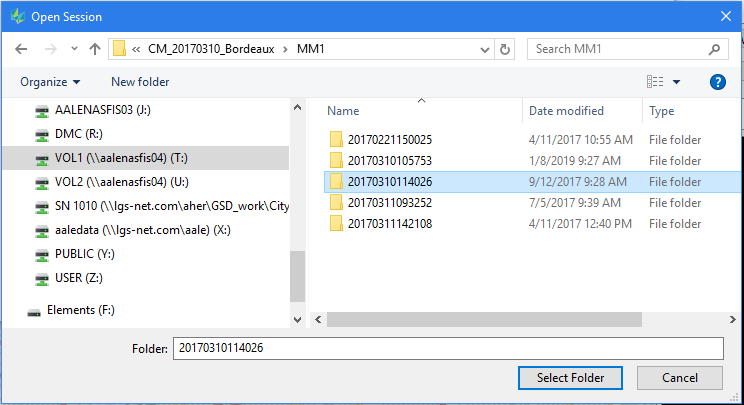
Start with browsing the raw session path
-
Select the desired raw session to work with
-
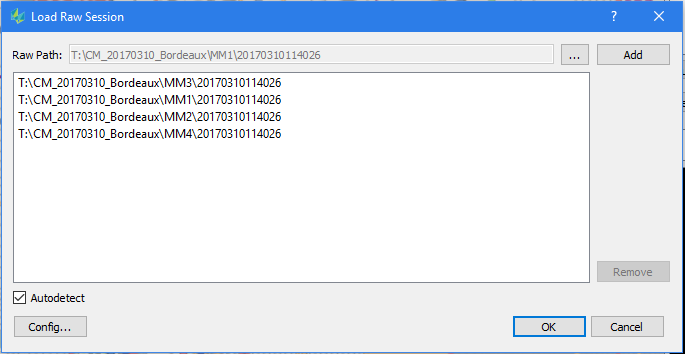
Activate the ‘Autodetect’ feature, then click 'Add'. Autodetect will automatically find the corresponding session data stored in other directories from the MM recording by FlightPro.
-
Click ‘OK’ for loading the session into the perspective
-
The session is then loaded into the data source view and visualized in the map view
Certain sensor systems require an adaptation of the steps described above to load their raw data. Details for these systems are provided below.