
HxMap GeoData provides an extensive coordinate system library as well as a coarse resolution global elevation model to support key features of the workflow. The default GeoData installation path for GeoData is C:\Program Files\Hexagon\GeoData. The following section provides details on how to verify and customize the GeoData delivered with HxMap.
Coordinate Systems
The coordinate system selection dialog is part of many dialogs of the HxMap Workflow Manager, e.g.
-
when defining a block, AT, 3D Editor, or HxMap project
-
when importing ground control points
-
when generating products
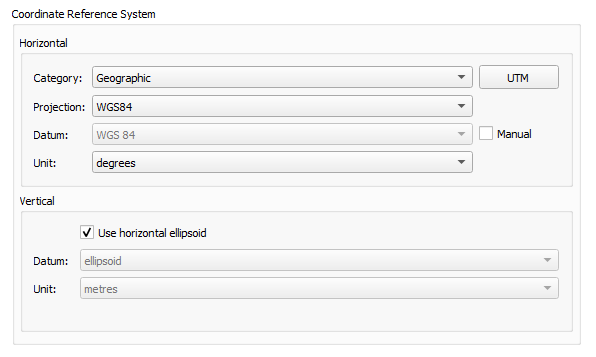
Horizontal
Use this section to specify settings for the horizontal coordinate system.
-
Category
Select the projection category from this drop-down list. This is the name of a category in which the projection is saved. -
Projection
Select a projection from this drop-down list. Your projection choices vary depending on the category you selected. -
Datum
A horizontal datum is a mathematical model of the Earth's surface that is used to
calculate the coordinate components of a point on the surface of the Earth. This field is read-only. Its content depends on the selected category and projection. -
Unit
Select the units associated with the horizontal system from this drop-down list
Vertical
Use this section to specify settings for the vertical coordinate system if it is not the
same as the horizontal coordinate system.
-
Same as horizontal
Select this check box so that the vertical datum is the same as the horizontal datum.
When this check box is selected, all other options in the Vertical section are inactive. -
Datum
Select the vertical datum from this drop-down list. The vertical datum is a reference
surface to which heights and elevations are referred. -
Unit
Select the units associated with the vertical system from this drop-down list.
Check spheroid and datum parameters
The procedures described below help to find out if a spheroid or a datum is predefined and what is the name of the spheroid or a datum, but also, if a spheroid or datum known by name in Leica HxMap has the correct parameters associated with it.
The data are stored in the file ’spheroid.tab’ which is located in the folder
C:\Program Files\Hexagon\GeoData\Geodetic (default installation)
Procedure to check spheroid parameters
-
Make sure Leica HxMap is not in use
-
Copy the file spheroid.tab and save it with a backup name
-
Open the file spheroid.tab with a text editor such as ’Notepad.exe’
-
Search for the spheroid name. e.g. Bessel. You find the following parameters:
"Bessel" alias "Bessel 1841" { 3 6377397.15500 299.15281285
where
3 = counter
6377397.155 = a of spheroid
299.15281285 = flattening -
Check if the parameters match the expected values.
-
Close the text editor
Procedure to check datum parameters
-
Make sure Leica HxMap is not in use
-
Copy the file spheroid.tab and save it with a backup name
-
Open the file spheroid.tab with a text editor such as ’Notepad.exe’
-
Search for the datum name. e.g. CH1903+ (L+T1997). You find CH1903+ (L+T1997) in section ’Bessel’ and the following seven transformation parameters:
"CH1903+ (L+T1997)" 674.374 15.056 405.346 0 0 0 0
where
"CH1903+ (L+T1997)" = Datum name
674.374
15.056
405.346
0000
= 7 parameter transformation
Global Elevation Model
The GeoData installer includes the GTOPO30 and SRTM30 global elevation models; GTOPO30 is configured for use by default. The global elevation model supports a variety of features in HxMap which require an elevation reference, and can optionally be used in product generation when accuracy is less important, i.e. rectification of ortho products for a basic coverage map.
The higher resolution 3-arcsecond SRTM dataset distributed for MissionPro may optionally be configured as a global elevation model for HxMap as well.
-
if not already available, download the Global Digital Elevation Models archive from myWorld under Downloads → Airborne Software → MissionPro → Tools
-
extract the six-part archive and run the installer. Be sure to select the SRTM3 dataset to be installed
-
update SRTM application setting as described in Application Settings | SRTM