CAUTION:
Ensure continuous power during the whole upgrade process. A loss of power during the upgrade process can leave the airborne system in a non-working state and would require assistance from Leica Geosystems Service.
IMPORTANT: Only perform the Leica FlightPro upgrade with a complete and working airborne system including OC61 Operator Console and PD61 Pilot Display.
Tools and items needed
-
Complete airborne system with all components set up for ground check. See the User Manual for the airborne system for instructions.
-
Empty USB 3.0 flash drive or USB disk drive
-
Leica FlightPro license file if needed
Preparing the installation USB flash drive
-
Insert the USB flash drive in the computer
-
Remove all files and folders from USB flash drive
-
Download Leica FlightPro installer and save the compressed file into a temporary folder
-
Extract the files from the compressed file to USB flash drive
-
Remove/eject the USB flash drive
Upgrade steps
-
Start airborne system
-
Wait until Leica FlightPro is started
-
Insert the USB flash drive into a USB connector on the OC61 Operator Console
-
Click the Service

-
Click the Upgrade

-
The Software / Firmware update message appears
-
Click the Confirm

-
System might shuts down and start again automatically
-
Leica FlightPro Installation/Upgrade start automatically
-
Check that PD61 Pilot Display is connected and switched on
-
Check that all other components are connected
-
Click Run button
-
Leica FlightPro Installation/Upgrade view is updated
-
Click Complete Installation button when the upgrade process is completed
-
Airborne system shuts down completely
-
Start airborne system
-
Load Leica FlightPro license file if needed
Installation checks
The FlightPro installer checks the following during the upgrade process and warns the operator before the upgrade starts.
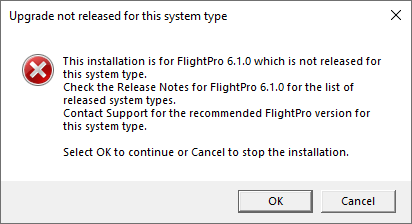
System certification
Check if the FlightPro release being installed is certified for the system.
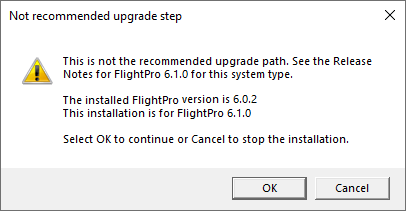
Missing FlightPro upgrades
Check if there is an intermediate FlightPro version that should be installed before installing the FlightPro release being installed.
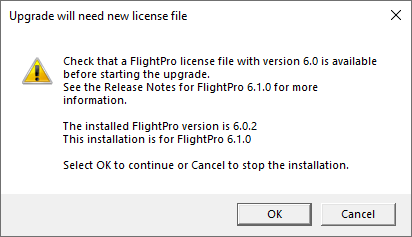
Newer license file required
Check if a newer license version file is needed